Today Apple is releasing OS X 10.8, also known as OS X Mountain Lion. This introduces a new technology called Gatekeeper. By default it prevents many applications for being installed, unless the applications have met some standards for ensuring they can’t easily be hacked to contain malicious code.
Today’s update meets the requirements for Mountain Lion and Gatekeeper.
What’s changed:
Changes for OS X Mountain Lion’s (OS X 10.8) Gatekeeper feature.
Hand replayer can now be resized
Improved handling of Merge Network hands where a player goes all-in as a consequence of posting a blind
A friend of mine started using Poker Copilot recently. At first she found the statistics mystifying, so here’s the advice I’d give her – and others. Agree with me? Disagree? Add you opinion in the comments.
—
When you start using Poker Copilot, the statistics can be confusing. Here’s how to make sense of the “big three” statistics:
Voluntarily Put $ in Pot (VPiP)
Preflop Raise (PFR) Post-flop
Aggression Frequency (Agg)
The first thing you should do with Poker Copilot is evaluate your own playing style using these statistics.
Voluntarily Put $ in Pot (VPiP)
This measures how often you voluntarily invested money into a hand. Paying the big blind, the small blind, or the ante is not considered voluntary. Therefore this percentage indicates how often you called, bet, or raised. The lower this value, the tighter your hand selection is. The higher, the looser.
What is a good VPIP range?
Tight is right.
Simple answer: between 15% and 20%. This assumes you want to play tightly, you are playing micro-stakes, and you are playing on full ring tables.
Now the more complicated answer: it depends a lot. If you are still learning to play good poker, then you should be very selective in which hands you play, so your VPIP might acceptably be a tad lower than 15%. The less people on the table, the more hands you can play. If you are on a table full of ultratight players, you can also loosen up. An experienced player who understands the subtleties of the game can get away with a VPIP between 20% and 27%.
Preflop Raise (PFR)
Limping is for losers.
The PFR statistic indicates how often you have raised before the flop is seen. A high value is an indicator of an aggressive player. A low value indicates a passive player. Good players are aggressive players.
Your PFR has a possible range of 0% to the value of your VPIP. e.g. if your VPIP is 20%, then your PFR can’t be higher than 20%. Ideally it should be a little lower than your VPIP, but not much lower.
Poor players and beginners tend to timidly fold or call preflop. Good players tend to fold or raise preflop, especially if no other players have yet raised.
What is a good PFR range?
Between 2% and 3% lower than VPIP. If your VPIP is 15%, PFR should be about 12%. These two numbers in combination, indicate that you are only playing quality hole cards, and you are predominantly raising with them pre-flop. In other words, you are playing how most poker books and poker forums say you should play.
Post-flop Aggression Frequency (Agg)
Agg indicates how aggressively you play post-flop. The higher this number, the more aggressively you are playing. This must be interpreted in combination with VPIP. Players who see very few flops will naturally tend to have a higher aggression percentage because they are only playing top-quality hole cards.
Poor players play timidly post-flop. They’ll check or call too often. Good players know to play good hands aggressively post-flop:
because players with speculative hands are forced to fold before they get free cards
because if they hit the flop or have a dominating hand, a bet or raise will increase their return
What is a good Agg range?
50% to 60% is ideal , assuming that you have a VPIP of 15% to 20%. Much higher, and you are probably overplaying speculative hands and bad hands. Leave the bluffing for the movies and for live play. Much lower and you are not playing your good hands strongly post-flop.
Want to know more?
Here are two good, recent books that have excellent sections on using poker statistics:
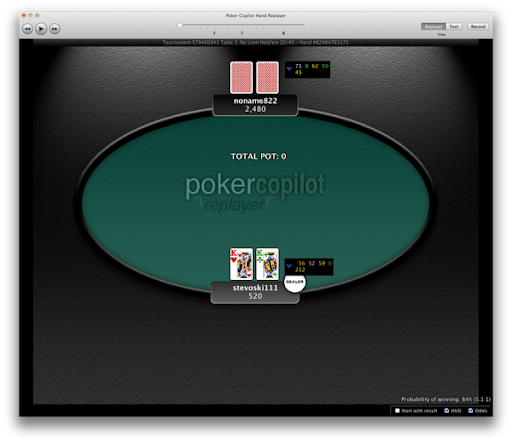
Up till now Poker Copilot’s hand replayer has always been at a fixed size. The next update will allow you to resize the replayer. Instead of this:
You can have this:
I’ll state clearly now that this is not perfect. The cards don’t scale well, as the card graphics I have are intended to be used at a pretty small size. At a large size they look like they are from an 80’s video game. I looked around the Internet for some free scaleable playing card graphics, but the ones I found were not suitable. They look good when large, but have to
o much detail when small. If you know of some good, free, playing card graphics I can use for the replayer please do let me know.
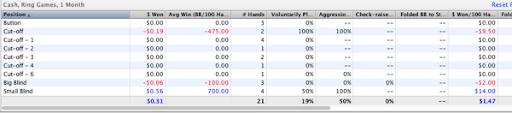
Added summary rows to some tables: day, stake level, hand type, position
Added Felt Stars support (Merge Network client).
Added Betsafe support (Ongame Network client).
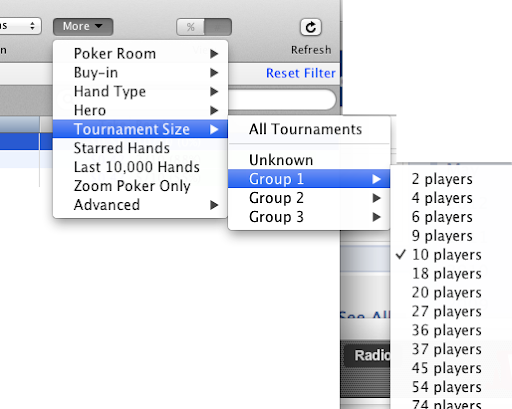
Fix: Tournament bankroll chart was crashing if a tournament size filter was in use.
Fix: After running Poker Copilot continuously for 24 hours, some tournament hands would stop importing correctly.
Known problem:
PokerStars playing audits are currently not always importable by Poker Copilot. This is due to some ambiguous date formats PokerStars has started using.
Lock Poker’s new Mac OS X software is not supported by Poker Copilot.
PartyPoker hands can’t be reliably imported into Poker Copilot. There are several problems in PartyPoker’s hand history file on Mac OS X.
Poker Copilot has a nice demo video. (Watch it if you haven’t seen it.) I recently got myself an iPad. The video doesn’t work on an iPad. That’s because the video uses Flash, and Flash is absent from iPads.
So I thought I’d change the video to use HTML5’s built-in video player. Oh but that won’t work on Internet Explorer 8. It’s an issue but not a huge one. But huger is that using video on HTML5 is a mess, if you want to support multiple devices and browsers. From Dive into HTML5:
There is no single combination of containers and codecs that works in all HTML5 browsers.
This is not likely to change in the near future.
To make your video watchable across all of these devices and platforms, you’re going to need to encode your video more than once.
Video, in this YouTube era, should by now be easy to supply. Sometimes we in the software industry make a real hash out of things.
The Poker Copilot user guide is now available in French. For now it is only available as a PDF, although I intend to make it a series of HTML pages too. Get it here.
Anyone who uses spreadsheets expects it to be easy to add a summary row to a table. In Java (the computer language I use for Poker Copilot), it is not easy. The language designers didn’t foresee the need for summary rows, so it involves some pretty nasty programming.
Which is why, until now, Poker Copilot hasn’t had summary rows. The next version will finally add this, in the Stake Level summary, the Hand Type summary, the Position summary, and the Day summary.
Poker Copilot does not support the current Mac version of Lock Poker. There are two reasons:
1) Lock Poker for OS X is currently actually a wrapped Windows version. This means that the poker windows can’t be detected through existing Mac programming techniques. Which means I can’t make the Poker Copilot HUD with Lock Poker
2) The hand history files seem to partly anonymise player names. This makes it hard to build up a database of player statistics. You might encounter the same player on five different tables, and each time the player’s name will be different. Until this changes, hand tracking is not useful.
As soon as Lock releases a native Mac version, I’ll reassess. On the 2+2 poker forums, a customer support guy for Lock says there is something in the works. However, I’d expect it to be some months before they will have it complete.