Summer time starts or ends in various parts of the world this month. This leads to problems with Poker Copilot for Merge Network skins, such as Carbon Poker, as Merge has its own timezone setting. Here’s what you need to check after the summer time changeover:
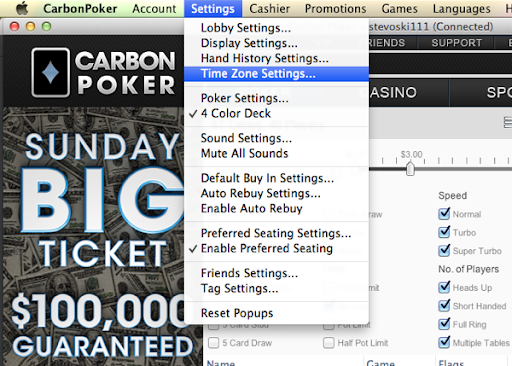
1) In Carbon Poker (or another Merge Network skin), select from the menu, “Settings” -> “Time Zone Settings…“
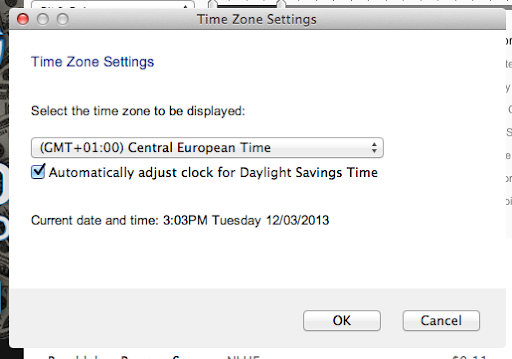
2) Make sure the “time zone to be displayed” is set to your timezone, and that the correct time is showing. The time in your Merge Network skin must match the time on your Mac for Poker Copilot to work properly.
3) To be certain the settings have been recognised correctly, you should restart both your Merge Network skin and Poker Copilot.
The improvements and fixes in the coming Poker Copilot 4 continue coming. There’s an EAP update that has the stats the SnG grinders have been clamouring for: Donk-Bet by street, Check-Raise by street, Squeeze bet, and Three-bet by position.
Poker Copilot 4 will be released in the coming months. So I’ll be refreshing some of our related design work. I’m starting with the Poker Copilot icon that you see in the OS X Dock, or in the Applications folder, etc.
Every time I release an update of Poker Copilot, I open up a checklist with each thing I must do. Over the last few years, the list has been refined, shortened, automated where possible, made clearer. I was partly motivated by the excellent The Checklist Manifesto.
Once or twice, I’ve not bothered following the checklist, and things have gone wrong. By now I should have learnt. But with the most recent update to Poker Copilot 3.26, I worked through half the list, and did the rest from memory. I forgot to perform this important step:
Step 6: Manually perform full download and install.
I didn’t do that step, and therefore didn’t realise for two days that I had a broken full downloader on the site. Sigh. I’m reminded again, that the purpose of the checklist is to avoid these situations that tend to be rather poor for sales.
If you tried in the last couple of days to download Poker Copilot, and it didn’t work, sorry, sorry, sorry. It’s now fixed. You can download from the home page or directly using this link.
If you play on a PokerStars Zoom Poker table, and the Poker Copilot HUD isn’t appearing, even though you’ve turned on the experimental Zoom Poker HUD, then please check if the table you are playing on is listed here.
If it isn’t listed, please send to me via email (steve@pokercopilot.com) the following information about the table, so I can add it to Poker Copilot:
Table name:
Table Type: eg. Limit, No Limit, Pot Limit, Cap Limit
Money Type: eg. real money, play money
# of seats: eg. 6-max, 9-max.
This will help me add any missing Zoom Poker tables to Poker Copilot.
Recently PokerStars has started creating hand histories in some cases where spaces are missing. This prevents the hands from loading. This update detects and fixes those problems.
(Poker Copilot 4 is under development. Buy version 3 now, beat the price rise, and receive a free upgrade to version 4 when it is released.)
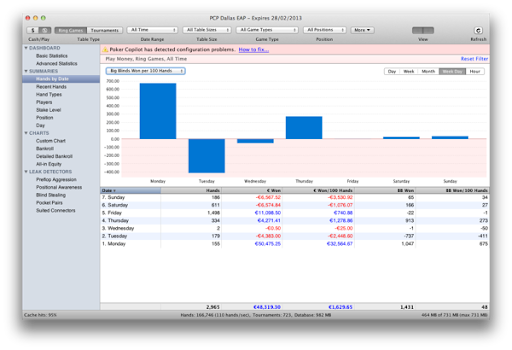
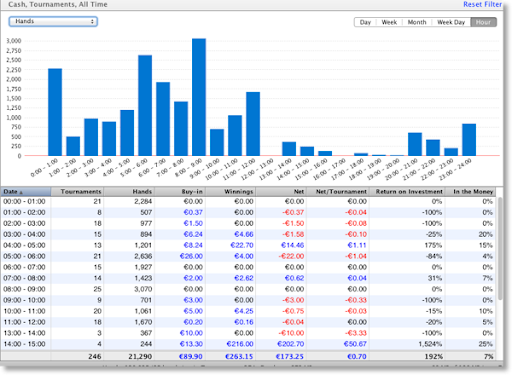
Poker Copilot 4 will have a new “Hands by Date” summary. Similar to the “Tournaments by Date” summary, it combines a chart and table in one screen. It allows you to group hands by day, week, month, and also hour of the day, and day of the week:
(Poker Copilot 4 is under development. Buy version 3 now, beat the price rise, and receive a free upgrade to version 4 when it is released.)
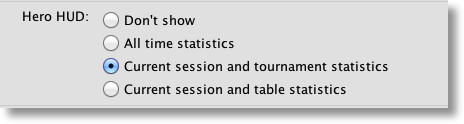
Poker Copilot 4 will allow you to show your own HUD statistics, either for all-time, the current session AND table, or for the current session AND tournament.
This should make a certain Poker Copilot customer happy. 🙂
(Poker Copilot 4 is under development. Buy version 3 now, beat the price rise, and receive a free upgrade to version 4 when it is released.)
Poker Copilot 4 lets you see how profitable tournaments are for you when they start in different times of the day. You can also see lots of other tournaments variables according to the hour of the day: