The new features in the forthcoming Poker Copilot 4 mean more text to translate. There are about 70 new strings that need translating.
I’m trying a website called Get Localization (fittingly, also available at http://getlocalisation.com/) to make the translations easier to manage. Would you like to translate a few strings? Then sign up here.
I’m initially trying this out with Dutch, French, German, Italian, Russian, and Spanish, as they are the most complete translations in Poker Copilot 3.
I’ve now added support to Poker Copilot 4 for Barriere Poker real money tournaments and real money ring games. The HUD works, the hand history folder is auto-detected, and your preferred seat is detected to make sure HUD panels appear in the right place. You can test this out in PCP Dallas EAP. Feedback welcome.
(Poker Copilot 4 is under development. Buy version 3 now, beat the price rise, and receive a free upgrade to version 4 when it is released.)
Today’s PCP Dallas EAP update adds support for Barriere Poker, play money only. It should work with ring games and tournaments.
If you use Barriere Poker, please please please send me some hand histories! This will help me add support for real money. I’m in Spain, where Barriere Poker doesn’t have a license to operate, so until now, I’ve been restricted to working on play money tables.
Barriere Poker is a popular poker room in France. I’ve been working in recent days on adding support for Barriere Poker to PCP Dallas (the forthcoming Poker Copilot 4). I now have some Barriere Poker hands being imported. There is still some work to be done, but this should be mostly working in the next PCP Dallas update.
If you play on Barriere Poker and you have some hand histories, I’d be grateful if you sent them to me at steve@pokercopilot.com. The more hands I have, the better I can find those pesky unusual situations that tend to break hand history parsers.
(Poker Copilot 4 is under development. Buy version 3 now, beat the price rise, and receive a free upgrade to version 4 when it is released.)
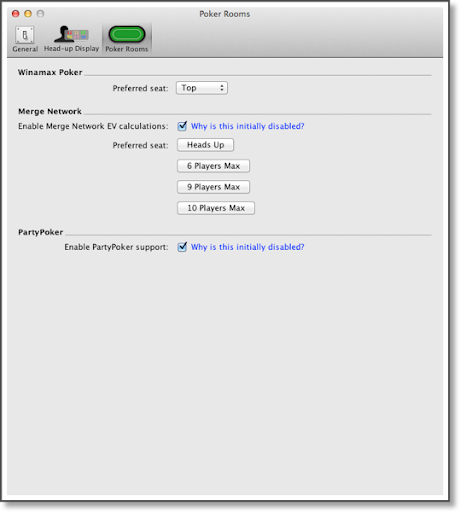
For reasons listed here, in Poker Copilot 4 I’m disabling All-in EV Calculations for Merge. To enable the All-in EV calculations you’ll need to go to the Preferences.
Likewise, for reasons listed here, in Poker Copilot 4 I’m making PartyPoker support disabled, but also available to be enabled.
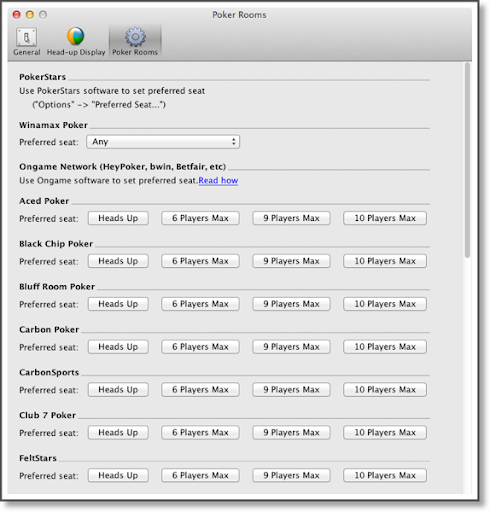
The preference panel where these new options belong is the “Poker Rooms” panel. It was haphazard, so adding these options was an impetus to redesign the panel. Here’s how it currently looks in Poker Copilot 3:
Here’s how it looks in Poker Copilot 4:
All Merge Network rooms now share the same Poker Copilot settings for preferred seat.
The text-only entries clearly belong in a user guide, and not in a preferences panel. So I removed them.
(Poker Copilot 4 is under development. Buy version 3 now, beat the price rise, and receive a free upgrade to version 4 when it is released.)
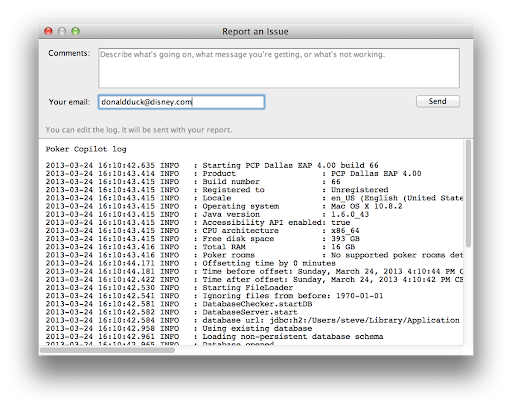
In Poker Copilot 4, I’ve added a new option in the Help menu: “Report an Issue…”:
When people report a problem, usually the first thing I need to request is a copy of the Poker Copilot log. This new screen will make it easier for people to report a problem AND supply me with the necessary information to help me investigate.
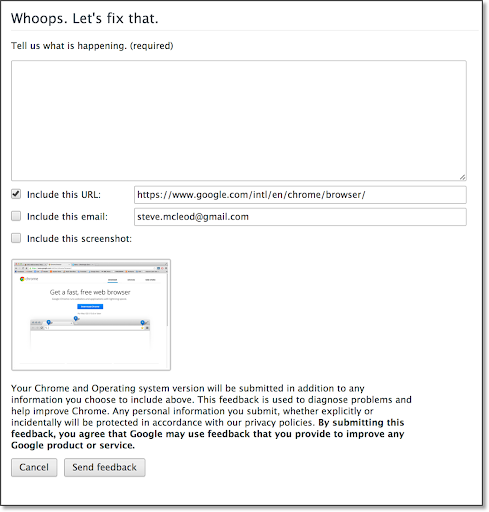
I was initially inspired by Google Chrome‘s similar screen:
Then I looked through all the Mac applications I frequently use to see if they had something similar. Copying someone else’s approach is much easier than designing a feature from scratch. The best example I found was in Transmit, my FTP application of choice. So the screen is almost identical to what the Transmit team have created.
A story about Transmit: I bought a new MacBook Pro two weeks ago. Usually I use the “Migration Assistant” when setting up a new Mac, so that I get all my applications, settings, passwords, and documents on the new computer. But I decided it was time for me to undergo the first time Mac user experience once more, to make sure that installing and using Poker Copilot on a pristine computer is as smooth as possible. In the process I needed to download and install my favourite applications. I discovered that Transmit’s first-time experience is a gem. The website is simple, clear, and with a big “Download” button being the first thing you see. Click it, and the download starts. Whereas Parallels Desktop, another otherwise excellent product, required me to click on five separate “Download” buttons/links before the download began.
Transmit costs money (although not much). There are plenty of free FTP applications, including one to which I inadvertently contributed some code. Other tools I use have built-in FTP clients. But nothing shines like Transmit. It is scriptable. It makes it easy to share common, favourite FTP server settings across computers. It allows me to edit remote text files within Transmit. It works with Amazon S3. It makes dealing with S3 file and folder permissions easier than does Amazon’s own web-based interface. The remote sync feature is simply a joy to use. In all, it is an excellent example of how to create, market, sell, and support Mac software.
My favourite Mac poker room is Winamax, a French operation. Why is Winamax my favourite? Because the team behind the poker room is really switched on, their software is great, and the operation is well-run. Whenever I have contact with a Winamax employee, I know that they’ll listen and respond. For example, some time ago when I asked them to add tournament summaries to their hand history folders, they didn’t say, “we’ll think about it.” They said, “How would you like them to be formatted?” Because of this attitude, Poker Copilot is able to fully support Winamax.
So good news: their software and their website is now available in English, as well as French. They accept players from all of Europe (except Belgium, Italy, Switzerland, and Liechtenstein).
Today, with the help of this discussion forum topic (mostly in French), I discovered a very specific bug in Poker Copilot. The bug: an error in all-in EV calculations for Winamax hands with antes, where you go all-in pre-flop, and someone calls the all-in bet with going all-in too.
Poker Copilot 4 (aka PCP Dallas) is nearing completion. I’ve eliminated most known bugs, and have been working on polishing the user interface.
The major remaining task is what I’m now calling the “Dynamic HUD”. This is the HUD mode for Zoom Poker/Rush Poker, but which will ideally also work with any table.
With regards to Retina displays, I’ve gone backwards from including Oracle’s Java in the application. Now PCP Dallas does the same thing as Poker Copilot 3, and uses Apple’s Java that should already be on most computers. Not ideal, but Oracle’s Java for Mac is simply not ready for desktop applications. The positive outcome of using Apple’s Java is that Retina displays are supported.
I’ve just hit a major roadblock with PCP Dallas (the forthcoming Poker Copilot 4). It looks blurry with Retina displays. One of the tasks on my “get PCP Dallas done” list is to make sure things work well with Retina. As that involved buying a new, expensive MacBook Pro to replace an older model that I still find satisfactory, I left the task aside for awhile. However I decided to follow my view that “good software development requires a well-equipped office”. I spent the money and ordered a new MacBook Pro with Retina display. It arrived today.
The results of running Poker Copilot on a Retina display? Poker Copilot 3 looks great. PCP Dallas? Unacceptable, in my opinion.
After doing some research, it seems this is a known issue in Java 7. Oracle, who make Java, will fix this in due time, but they haven’t publicised a fix date.
Apple has been encouraging us Mac+Java developers to move to Java 7 and to embed it in our software. So I followed their suggestion. I think perhaps they are encouraging us to do so prematurely.