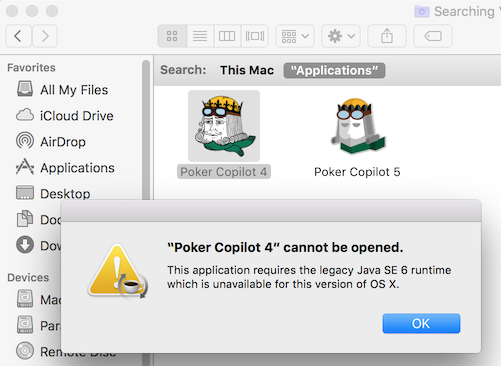
I’ve spent the last two days working out why recent Poker Copilot updates don’t fully work on OS X 10.7. An internal component (JavaFX) used by the Session Overview is not fully supported by OS X 10.7. So the Session Overview won’t show in OS X 10.7.
As soon as you update to OS X 10.8 or higher, the Session Overview will appear again.
I’m astonished at how potential performance improvements can hide in software year after year. Today I discovered a small tweak to make Poker Copilot zoom through loading hands into your database. The improvement results in a sustained 50% increase in speed. Before the change, Poker Copilot would load about 200 hands/second. Now it is toils away at more than 300 hands/second.
In recent weeks I’ve been using an excellent developer tool called Java VisualVM to find the parts of Poker Copilot that hog the computer’s CPU, and use the most memory. Today I discovered that H2, the embedded open source database engine that Poker Copilot uses, was spending too much time analysing each SQL statement before performing it. A default performance setting was by default set too low. I set it to a much higher value, and it is like I discovered I’ve been driving up to now with the handbrake on.
(For the technically minded, and also for any H2 google searches: I increase QUERY_CACHE_SIZE to 100, instead of the default value of 8.)
The next update of Poker Copilot is due to be released this week, and will have this performance improvement, as well as some others I’ve been working on.
This is a big merger: according to Bloomberg, 888poker is buying bwin.party for US$1.4 Billion.
bwin.party is already a product of the 2011 merging of bwinPoker and partypoker.
When bwin and partypoker merged, it led to a painful time for Poker Copilot support as a series of updates/switchovers of skins occurred spread out over two years. This led to many awkward user problems to solve. As a consequence we improved the information we obtain from Poker Copilot’s built-in Report an issue… feature.
Now I’m immediately wondering whether this new takeover will lead to another series of such painful switchovers.
Poker Copilot supports 888poker, partypoker, and bwinPoker.
We’ll keep Poker Copilot updated regularly to work with whatever changes this takeover entails.
Summary: as of the next update of Poker Copilot, the Player summary will only show players you’ve seen in the last 30 days. It will, however, show all-time data for those players. This fixes a bad performance problem.
Last year, while working on improvements for Poker Copilot 5, I found that the Player summary in Poker Copilot was not including all the data that it should be including. I modified it to make it more correct, but in the process it became slow. For a large database, with the date range set to “All time” it could take a minute or two.
The basic problem was this: you may have a million hands in your database, with up to 10 players per hand. We store these hands in a database table, one row per player per hand. That’s 10 million rows of data. To show you information for the players in your database, those 10 million rows need to be speedily read, filtered, summed, and sorted – all in a desktop app with an embedded database.
On a stand-alone, dedicated database server, you could simply give the database server a beefy CPU and plenty of memory, and the problem would go away. Give it enough RAM to hold the entire database to memory and you’ll get sub-second performance.
In a desktop app we can’t be so generous in using up all your computer’s memory. We can’t even assume that your computer has plenty of RAM (Although note: the best way to make Poker Copilot run faster is to increase your computer’s memory).
Another common solution is to use some summary tables prepared in advance. Poker Copilot offers arbitrary filtering on almost any conceivable characteristic of a hand, which means that for this particular screen we can’t have the data already summarised; we need to do it on demand.
So I’ve been thinking of changes I could make in Poker Copilot for a faster Player summary, while keeping it useful. One idea that kept running through my head is that you typically only care about the players you’ve seen in the last few days. In fact, mostly just the current session is important. For the players you’ve played against today, you want to see their all-time statistics. But for people you haven’t seen for weeks or months? Not important for improving your poker game.
It turns out that by filtering out all players who you haven’t seen in the last 30 days, we can filter and summarise those 10 million rows of information in your database in a few seconds. If you further restrict the date range of player data to, say, six months, and it is even faster, in many cases down to less than a second, which is usable performance, I think.
I’m trying to put together thelist of Mac poker rooms that run natively on OS X. I have a list already, but I think it lists many rooms no longer running. This is particularly with the networks that have many skins, such as Ongame and Merge Network.
I’m aiming to keep this list up-to-date. It is a work in progress; as I confirm that rooms still exist, I’ll add the URL to their home page.
I’m considering adding some “geolocation” code to determine which country visitors to that page are coming from. This will make it possible to ensure that the rooms that are actually legally available to you are shown first, with other rooms pushed down the list.
Apple has made the upcoming OS X 10.11 update (El Capitan) available for developers. Does Poker Copilot run on El Capitan? Yes, but with a couple of glitches.
I managed to play a Winamax session on OS X El Capitan with Poker Copilot’s HUD. Things seemed normal and smooth. But Poker Copilot’s main window has a couple of glitches. I’ve investigated and found that these are problems with Java on El Capitan, upon which Poker Copilot is built. We’ll stay alert to this issue, but ultimately, we’ll rely on Apple and/or Oracle (who make Java) to have a fix ready before El Capitan is released.
In summary: you can already use Poker Copilot on OS X El Capitan.